Yahoo SMTP Settings
| Setting | Value |
|---|---|
| Server Address | smtp.mail.yahoo.com |
| Username | Your Yahoo Address (e.g. [email protected]) |
| Password | Your Yahoo Password |
| Port Number | 465 (With SSL) |
| Alternative Port Number | 587 (With TLS) |
| Internet Protocol | Required |
| Sending Limits | 500 Emails a day or Emails to 100 connections a day |
Know More About Yahoo
Yahoo operates is available as three things: Content Platform, Communications and Advertisement Platform. For Content, there is Yahoo News, Yahoo sports, Yahoo finance, omg, answers, games, tv, music, local listings and what not. For Communication, it has Yahoo Mail, Yahoo Instant Messenger and Yahoo Groups.
Yahoo Mail is one of the top shelf email providers which comes right after the big giants Gmail and Outlook. It has over a Billion active users as per Feb, 2016. There are two types of account you can have if you are a Yahoo user: Basic Yahoo Account or Yahoo Plus Mail account. We have another page dedicated to Yahoo Plus Mail. So, this page will all be about Yahoo mail.
An Added Layer Of Security Called 'Less Secure Apps'
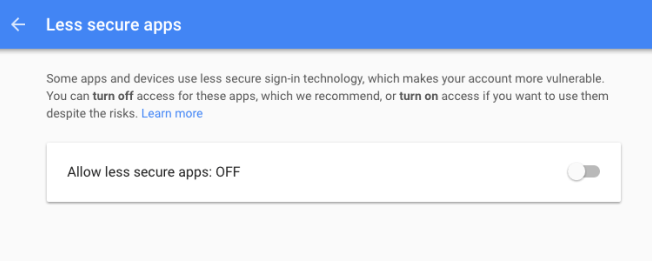
Yahoo is also there with Google when it comes to security. There is an added layer of security to your Yahoo account called 'Less Secure Apps'. When a third party server tries to read or enter into your Yahoo mail account, it gets blocked by Yahoo servers if their security is not up to Yahoo's standard. Generally, it is not recommended to enable 'Less Secure Apps' option as enabling it option can be a potential risk to your Yahoo mail account and can put your account's information in danger. We would strongly advise against it.
- 1
Go to Account Info
- 2
Select "Account Security"
- 3
Enable "Allow Apps that use less secure sign in"
Two-Step Verification Notice
There is one other catch. If you are a Tech Savvy person or a person who loves his/her privacy, you might have enabled 'Two Step Verification' process for your Yahoo account. When that is in play, the option of 'Less Secure Apps' is off the table.
With 'Two Step Verification' option enabled, the 'Less Secure Apps' option won't be visible and the page will look something like this...
To enable 'Less Secure Apps', You will have to disable 'Two Step Verification' for your Yahoo account. After that, 'Less Secure Apps' can be enabled with just a click/touch.
Automate Your Cold Email Campaigns
No credit card · 7-day free trial